Away3d: 2.3 released
3d Flash, Away3d code demos, Away3d releases February 12th, 2009The 2.3 update of Away3d has been released! This new version comes in two flavours, a legacy Flash 9 version for all people wishing to carry on using Away3d in their current projects, and a new Flash 10 version for those lucky enough to be already developing in cs4 and Flash 10.
Added features in the version are many and varied! Some highlights include:
- Frustum and nearfield clipping
- Object culling (using frustum calculations)
- Camera lenses
- Advanced normalmap tools
- Bezierpatch tool for creating smooth surfaces
- Improved memory management
- Improved extrusion tools
- Billboard mesh objects
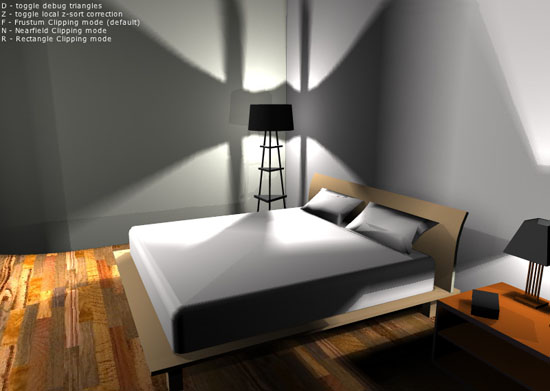
The Frustum room demo shows the new frustum clipping class in action. The 3d room can be navigated with no clipping artifacts that are usually a common problem with interior scenes such as this. The frustum technique involves slicing triangles to the viewing window rather than removing them.
Use the mouse and cursor keys to navigate, and the keyboard shortcuts listed in the demo to see various different render options for a comparison between old and new.
As always, the source for the demo is available here, or by right-clicking in the demo window.
Frustum culling is only one of the new features on offer - for more information on others, head over to away3d.com!


February 13th, 2009 at 2:30 pm
Nicely done Rob!
February 13th, 2009 at 2:32 pm
Mr.oob, right
February 22nd, 2009 at 3:33 pm
I had been debating on which 3D engine I was going to start using. Papervision and Sandy were in the running, however the endorsement from the ‘Hoff sealed the deal. Away3D it is.
Just my kind of easter-egg Rob.
April 18th, 2009 at 8:56 am
Hello, Rob Bateman! Tell me, please, what means “view.addSourceURL(”srcview/index.html”);” in your code? Thank you.
April 18th, 2009 at 5:12 pm
@akman
“view.addSourceURL(”srcview/index.html”);” is a custom method to add a “View Source” link item to the right-click menu. Away3D already adds link items to the right click menu for the stats panel and so on, so we can’t use the default flex method for adding a “View Source” option as the Away3D links would be overwritten.
April 19th, 2009 at 1:12 am
Thank’s. But when I try to create this room by Flash Cs4 I always take error (on the cube in the flash window):
“Loading geometry… Error #2032″
April 19th, 2009 at 9:25 am
@akman
make sure you run the swf in the same folder as the fla, otherwise the demo will have trouble locating the external room assets when loading. The local folder assets/room/ should be present, containing the 3ds model and texture files.
May 29th, 2009 at 12:21 pm
I get the same error as akman and having everyting in the same folder does not work if I try to see it from the above address (http://www.raizzangel.com/wg/earth3D_4.html), but if I double-click it in explorer, it works fine… why does it not work through the internet?
May 29th, 2009 at 12:37 pm
@Thunder
From your error, it looks like you are trying to access a file called Wormglow.obj. However, there is no file called Wormglow.obj at the relative filepath on the server (http://www.raizzangel.com/wg/Wormglow.obj), so that looks like the cause of your problem
May 29th, 2009 at 1:03 pm
I guarantee you that file is there, I am looking at it with my own eyes… Wormglow.obj, capital W. Do you know if it could be an access violation due to Windows Vista?
May 29th, 2009 at 1:46 pm
Apparently IIS7 forbids anyone from accessing copyrighted extensions such as .obj, .3ds, etc… at least that’s what I can tell… all you have to do is to delete the extension from both the physical drive and within the flash code and it will load well… Thanks.
August 11th, 2009 at 10:08 am
Nice example, thanks.
Could you please explain or give a link to further information about the initObjects() function?
I understand that initMaterials helps the textures display better, but not sure how to adapt initObjects or its purpose? cheers.
August 11th, 2009 at 2:57 pm
Hey Dave
I think you are referring to the initialiser object? This is an optional untyped object that can be used on most Away3d classes to pass default property values of an instance in it’s constructor.
It is important to stress that there is no performance or display benefit gained from using the initialiser object, and it is possible to ignore this way of working altogether if preferred. Instance properties in all Away3d classes can be set in the more common way using typedchecked getters and setters, after instantiation.
August 12th, 2009 at 3:49 am
Hi Rob, thanks for your quick reply. I just realised the part I was referring to was how to z-sort individual objects, as this code was a bit confusing to me at first. Not to worry though as I’m only dealing with empty rooms in this project.
What I’m really struggling with is the collision map - what relationship does the image file have with 3ds model? As not only can I not get them to match position wise, the scale seems off aswell?
August 12th, 2009 at 5:00 am
Hey Dave
yes, unfortunately the collision map was positioned using trial-and-error, there is no magic formula to line it up. The image itself was generated by creating an orthographic view of the scene in Away3d with the camera looking straight down, taking a snapshot image, and then colorising the correct areas in photoshop.