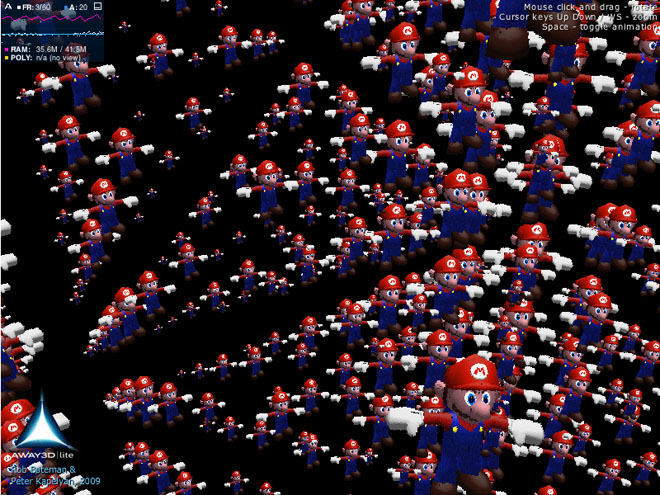
Get ready for Mariogeddon!
Away3D Lite has seen two important additions in its 1.0.2 dot release: MovieMaterial and Sprite3D. The former is a direct port of the standard library counterpart – the latter a slightly more advanced version of the Sprite2D class that accepts a material rather than a bitmap as it’s primary skinning technique.
Combined, these additions allow new and interesting setups like the one demoed above! Here we have 1000 Marios created using Sprite3D objects, fed from a single MovieMaterial. The material uses a second (hidden) view to render the actual Mario object. It would be virtually impossible to do this effect any other way, as the mario model has around 500 faces, multiplying up to a whopping 500,000 faces if each were an actual 3D object.
Some controls on the demo allow you to navigate around – click and drag to spin the cube, use Up & Down cursor keys to zoom in & out, and if you get bored with the slightly regimented nature, press the Spacebar to animate!
Another feature of the new Sprite3D object used here is an optional positioning technique which helps with simulating perspective. As the Sprite3D object is just a simple quad in 3D space, it needs to be constantly rotated to face the camera in order to appear face-on. In standard billboarding, the orientation is made to appear uniform at any position in the view (ie. as if the sprite’s bitmap has just been scaled). With the Sprite3D object in Away3D Lite, we can use a trick that counters this uniform look to appear more natural at wider angles, called “viewpoint orienting”. Check out this article which explains what i’m on about much better than i can here.
Further additions in 1.0.2 are the introduction of quads to a face object (which reduces sorting costs), the brand new AwayStats panel (with more than a nod to DoobStats ), and the welcome return of the View Source menu item! Right click anywhere in the demo to open the menu, or access the source files directly from here. Of course, compiling requires the very latest update from the Away3dLite svn repository.
Stay tuned for a more official Away3D Lite release (v1.1.0), coming soon…